> For the complete documentation index, see [llms.txt](https://help.littledata.io/llms.txt). Markdown versions of documentation pages are available by appending `.md` to page URLs; this page is available as [Markdown](https://help.littledata.io/accounts-and-billing/choosing-a-plan.md).
# Choosing the right plan for your store
How to choose the right plan for your store. Connect your Shopify store to all major marketing platforms. Get a dedicated account manager and access to a team of analytics experts.
Littledata offers a range of [pricing plans](https://www.littledata.io/pricing) for e-commerce stores. In line with [our values](https://www.littledata.io/about), we've built our pricing to be fair and transparent, so there is an option for *any online store* to get accurate sales, marketing, and customer data.
* [Littledata plans](https://www.littledata.io/plans): plug-and-play solutions for brands processing up to 1,500 orders per month
* [Littledata Plus plans](https://www.littledata.io/plus): designed for larger DTC brands, Plus plans include higher data thresholds and SLAs, account management, analytics training, and more. Book a demo to learn more.
## Flex plan
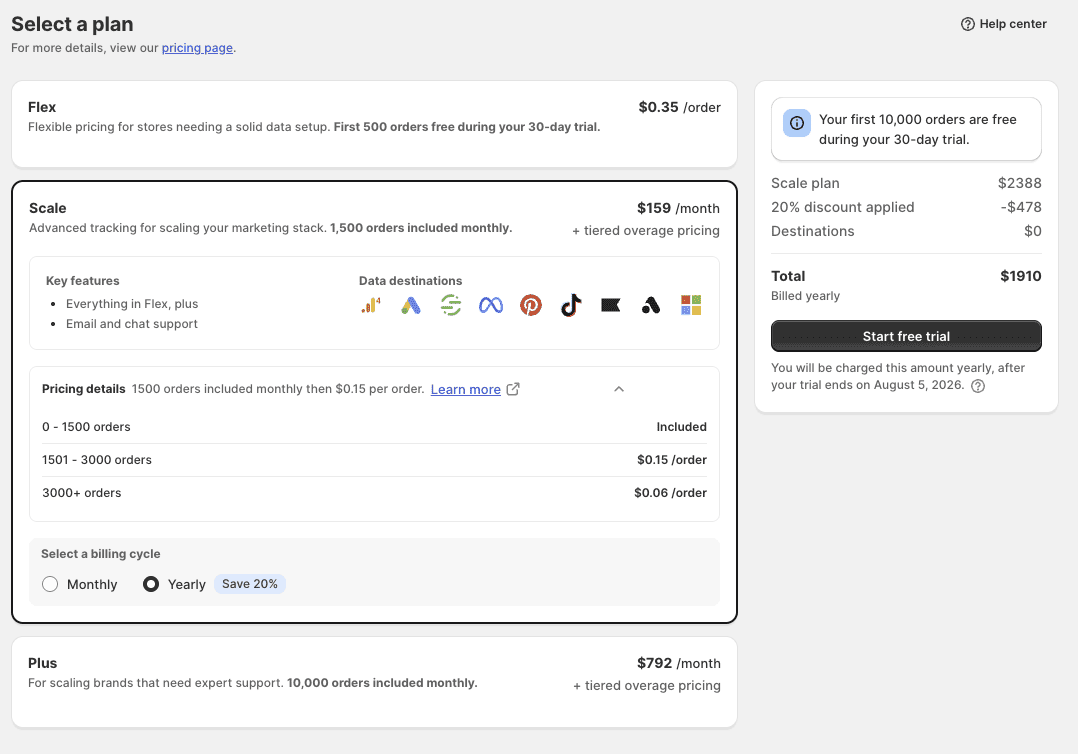
For a price of **$0.35 per tracked Shopify order**, we will process your data to all our available destinations.
At the end of the monthly billing cycle, you will be charged according to the number of orders created in your Shopify store.

Based on the order volume of your store, an estimated monthly charge is displayed in the billing widget to help you get a rough estimate of Littledata's Flex plan.
{% hint style="info" %}
The Flex plan offers all data destinations, except Segment.
{% endhint %}
## All-inclusive plans
Littledata's tiered plans are all-inclusive, meaning that all data destinations are included with every tiered plan. Each plan has an order threshold that, once exceeded, is billed at a tiered overage rate.
Plans that Littledata offers:
| Plan | Order threshold | Overage fee | Monthly total |
| ----- | ------------------ | ----------------------------------------------------------- | ------------- |
| Scale | up to 1,500/month |
$0.15/order (1,501-3,000) $0.06/order (3,001+)
| $199 |
| Plus | up to 10,000/month |
$0.03/order (10,001-50,000) $0.02/order (50,001+)
| $990 |
{% hint style="info" %}
**Save 20% with an annual plan**
By choosing an annual plan, you unlock a 20% discount on your Littledata subscription.
{% endhint %}
## How billing cycles work on Shopify
Littledata charges are processed through Shopify Billing, so they appear on your regular Shopify invoice rather than as a separate payment. This means the timing works a little differently than a direct subscription:
* **Your Littledata billing cycle is a recurring 30-day period.** It starts on the day you approve the app charge and renews on the same day each month. The subscription charge for each period is created at the **start** of that period. On the Flex plan, usage fees for tracked orders are calculated at the end of the cycle.
* **Shopify invoices on its own schedule.** Shopify collects app charges as part of your store's regular billing cycle, so a Littledata charge may show up on your Shopify bill days or even weeks after it was created. A charge dated late April, for example, might not appear until your mid-May Shopify invoice.
* **Uninstalling stops future cycles, not the current one.** When you uninstall Littledata, no new billing periods will start. However, a charge that was already created for your current period will still appear on your next Shopify invoice. To avoid being charged for a new period, uninstall before your next billing cycle begins. You can check your upcoming charges anytime in **Shopify Admin → Settings → Billing**.
For more detail on how Shopify handles billing cycles and app charges, see [Shopify's guide to billing cycles](https://help.shopify.com/en/manual/your-account/manage-billing/managing-your-bills/viewing-your-bills/billing-cycles-thresholds).
{% hint style="info" %}
If you spot a charge you weren't expecting, reach out to us at and we'll walk you through exactly what it covers.
{% endhint %}
## Trial limits
Every plan includes a 30-day free trial. Each plan has a number of orders included free during the trial:
| Plan | Orders free during trial |
| ----- | ------------------------ |
| Flex | 500 |
| Scale | 10,000 |
| Plus | 20,000 |
If your store processes more orders than your trial limit before the 30 days are up, you'll be charged for the additional orders at your plan's standard overage rate.\
Your trial still runs the full 30 days either way; the limit only affects when usage charges start, not how long you get to trial the app.
Each store gets one free trial. The 30 days start when you first approve a plan, and they keep counting if you switch plans or uninstall and reinstall the app. So if you come back after your trial has ended, billing starts straight away.
## How to upgrade
As your store grows, so will your Littledata subscription. When you exceed the threshold for your current plan, you will need to upgrade to ensure [continuing data processing](/accounts-and-billing/what-happens-when-my-website-exceeds-the-littledata-pricing-plan-limits.md).
The upgrade process just takes a couple of clicks in the app:
1. Access the Littledata app from your store admin.
2. In the left navigation bar, click **Billing**
3. Choose your desired plan and click **Update plan**

## Save with an annual plan
By paying annually, you can save 20% on your Littledata subscription. You can opt for the annual charge by going to the billing page, switching to an annual subscription, and accepting the new charge.

## Choosing the right plan
Which plan is right for you?
That's a question only you can answer. But we're happy to help :)
Of course, there's more to a business than its size. Which plan is best for your current business goals?
When picking the right plan for your site, our customers have found these questions to be the most useful:
* Do you need help with data audits or tracking plans?
* Do you run multiple brands or localized sites?
* Are you an advanced Segment user?
* Do you use GTM?
If you answered "yes" to any of those questions, we recommend the Littledata Plus plan to ensure you get the most out of Littledata.
## Upgrading for more support
Our app will automatically find the right tier for your store, but if you're a growth-oriented store that wants the best possible support, you can always upgrade to a higher-tier plan.
So if you're a smaller store on the growth path, you are welcome to upgrade to a Littledata Plus plan for extra support and higher SLAs.
{% hint style="success" %}
Littledata Plus plans are 1/10 the cost of hiring an outside developer or agency for custom tracking and reporting.
{% endhint %}
## Grandfathering (legacy plans)
Like many SaaS products, we periodically increase pricing for the Littledata app. When we do so, current paid users are sometimes 'grandfathered in' at their current rate.
We aim to give our loyal customers the best deal, but we reserve the right to ask you to move to the latest pricing plan to continue using all the features we invest in.