> For the complete documentation index, see [llms.txt](https://help.littledata.io/llms.txt). Markdown versions of documentation pages are available by appending `.md` to page URLs; this page is available as [Markdown](https://help.littledata.io/google-analytics/conversions/track-refunds-shopify-ga4.md).
# Refunds tracking in Shopify: turn ecommerce loss into your secret weapon
Boost your e-commerce ROI by mastering GA4 refund tracking. Learn to identify high-return products, optimize ad spend, and focus on net profit over raw sales.
For most Shopify stores, refund data is a "cleanup" task for the accounting department. However, when treated as a primary performance metric, refund data becomes a powerful tool for identifying hidden friction in your sales and helps steer your store toward real world profitability.
### The importance of accurate server-side refund tracking
The gap between "goods purchased" and "goods kept" is often a black hole in standard analytics. By using server-side tracking, Littledata captures refunds at the source, the moment they happen in Shopify, and tags them with an identifiable parameter: the transaction\_id.
This info is then used as the key that joins the Refunds back to the list of Purchase events. Because the Transaction\_ID is consistent across both events, we can surface all the original purchase properties like the traffic source, the specific campaign, or the customer’s location and apply them to the refund analysis. For the underlying refund event behavior, see [How we track refunds in Segment and Google Analytics](/sources/shopify/tracking-order-refunds-with-littledata.md).
Tip: if you’re not sure how to build the report itself, use [GA4 Explorations: A Complete Guide for Ecommerce Growth](/google-analytics/behavior/ga4-explorations-complete-guide-for-ecommerce-growth.md).
### Step-by-step: creating the Refunded purchases segment
To turn this data into action, you need to isolate the purchases that didn't stick. Here is a simple workflow to create a "Refunded purchases" segment in Google Analytics 4:
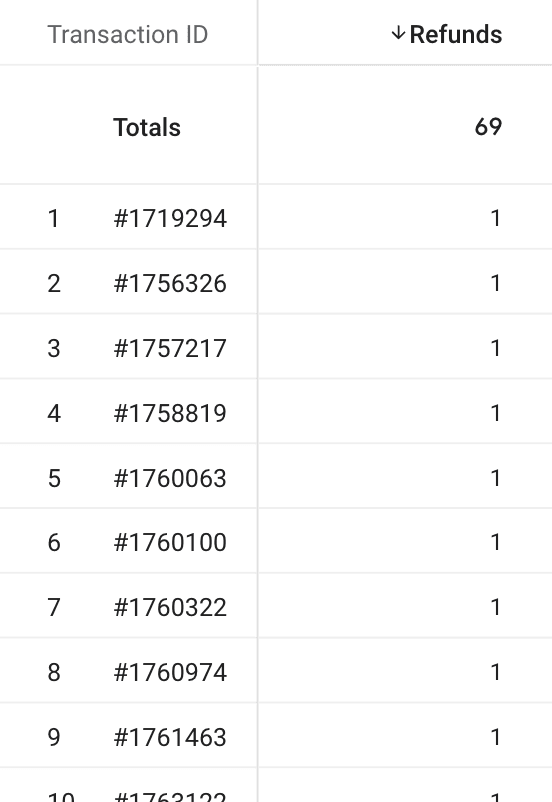
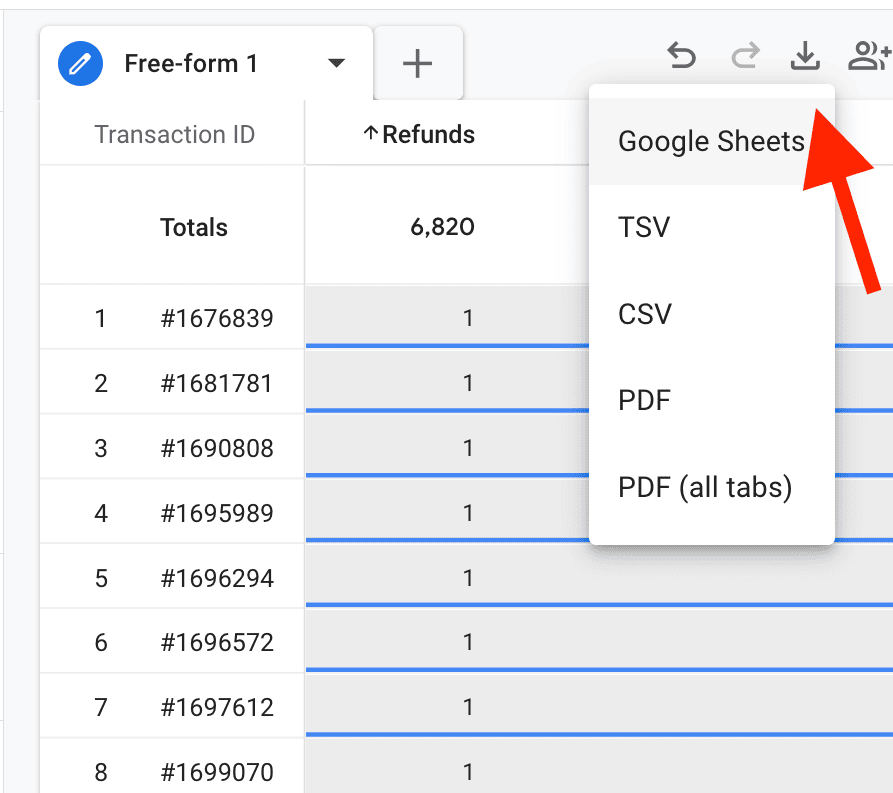
1. Export: List all your refund events for a specific time range and export their accompanying Transaction IDs to a Google Sheet.
2. Once you’re in the Google sheet - select and copy all the values in Transaction IDs column
3. Segment: In GA4, create a new Event-based Segment.
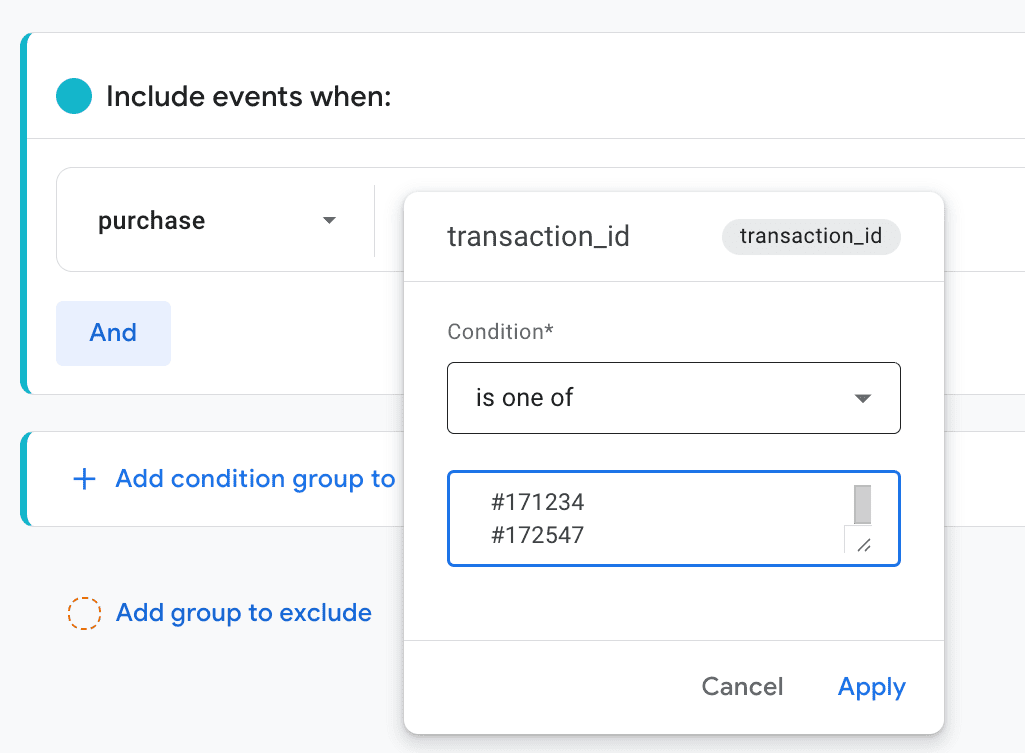
4. Filter: Set the condition to include the purchase event where the transaction\_id parameter "is one of" and paste your list from the spreadsheet.
You now have a segment filled exclusively with purchases that were refunded during the chosen time range. You can now apply any dimension and see exactly where your profit is leaking.
Please note that some of the refunded purchases happened outside this same time range, so not all refunds will be present in the reports described in following text.
{% hint style="info" %}
Need a refresher on building event-based segments? See [Segments in Google Analytics](/google-analytics/behavior/segments-in-google-analytics-4.md).
{% endhint %}
### Optimizing marketing spend for profit, not just revenue
High-traffic campaigns often look successful on the surface because they drive raw sales. But if those sales don't stick, you’re essentially paying to create work for your customer service team.
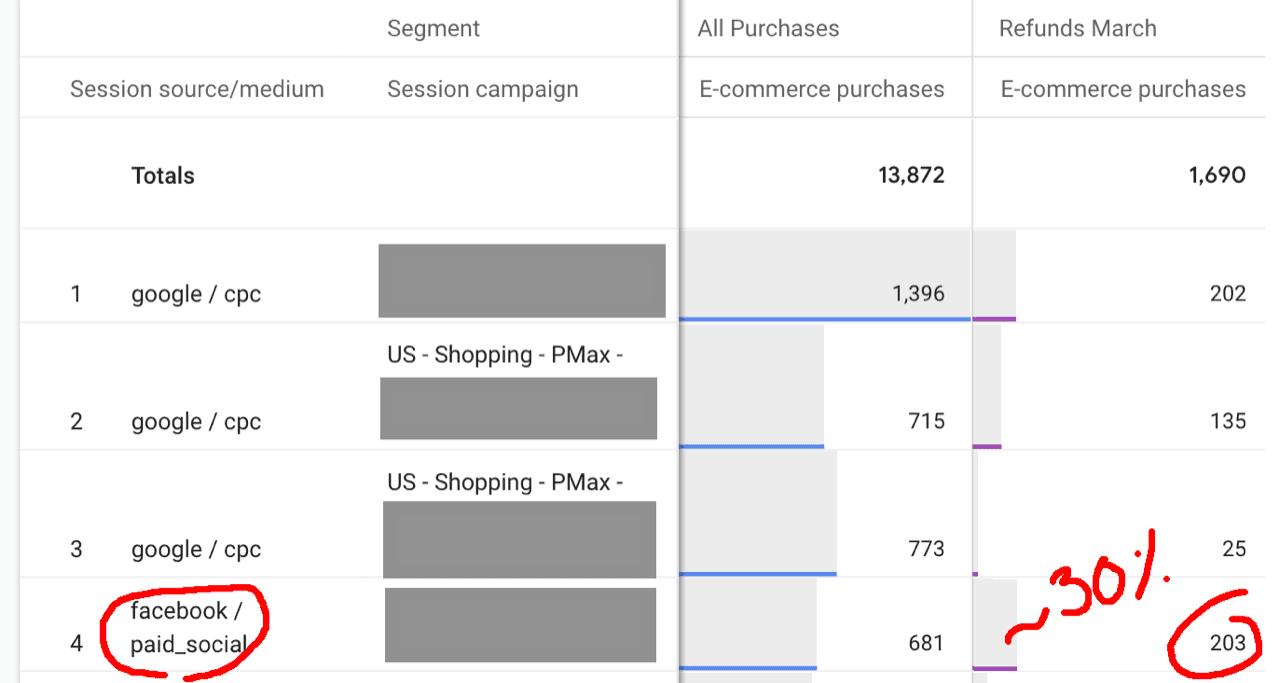
By adding Session source/medium or Session campaign dimensions to your Refunded purchases segment, you can see the ratio of refunds in the total purchases volume by traffic source.
In the screenshot above you can see how a specific Meta campaign drove significantly higher ratio of refunds (30%)
This technique can also be very useful for brands relying on influencer campaigns - an influencer might bring 100 sales with a 4% refund rate, while another brings 150 sales with a 40% refund rate. At first glance, the second looks better; in reality, the first one is far more profitable.
Affiliate campaigns too can drive high initial volume, but if you are paying high commissions on sales that are ultimately getting returned, you are losing money twice.
The goal is to shift your budget away from "high-overhead" traffic and toward the channels that bring in satisfied customers.
### Identifying product friction: when particular items tell a story
Often times th refunds are not randomly distributed among items. When you analyze your data by Item name or Item category, patterns could emerge that indicate a failure in the specific product related experience. Examples:
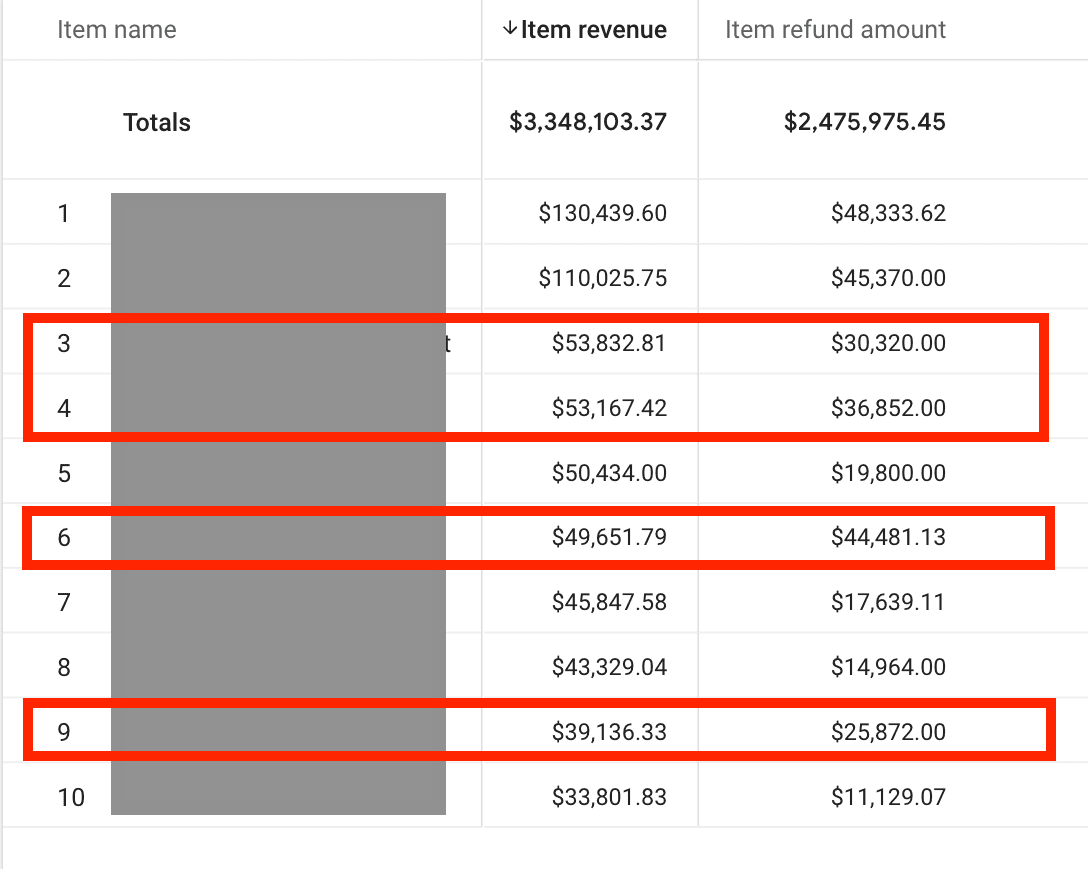
* Size: If a specific item (or a group of them) has a spike in refunds due to "size complaints," your size guide is failing you. In the following screenshot we see a refund report where items 3, 4, 6 and 9 were all shoes which helped the brand to rethink its sizing guides to reduce return rates
* Visuals mismatch: If customers frequently claim that the particular product "doesn't look like in the photo," it’s a clear signal to reinvest in high-quality, accurate product photography.
Fixing these UX issues is often the more efficient way to grow compared to standard omni-present CRO “best practices”. Lowering your refund rate by as little as 5% through better product information is significantly cheaper than spending the marketing dollars needed to acquire an equal amount of new customers.
### Adjusting the true Lifetime Value (LTV)
Standard LTV reports in GA4 are based on gross revenue and don’t take refunds into account. However, a "good enough" look at the truth can be achieved by applying a deduction factor based on your refund data.
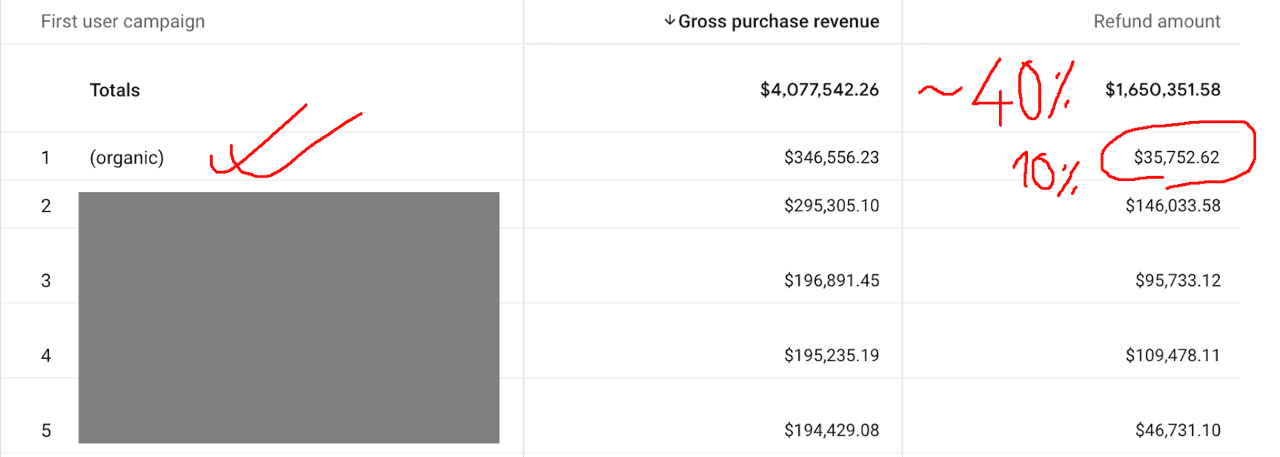
For example, if your refunds make 40% of all the purchase revenue that’s the percentage you should lower the LTV numbers.
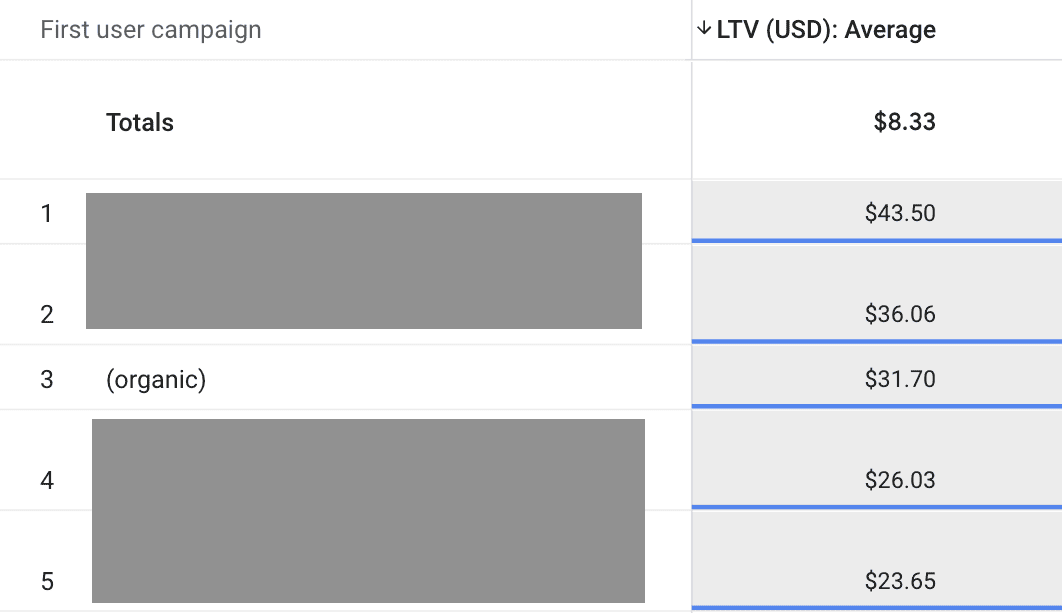
But, when ‘slicing’ data by First user campaign, you might find that your Organic Search customers have a lower refund ratio than your overall benchmark.
Hence, their Adjusted LTV should actually be lowered less than LTV from the other campaigns that sit higher in the raw LTV list:
Factoring these deductions into your overall LTV calculations ensures you aren't overvaluing expensive, high-churn traffic segments. To go deeper, see [Building a Lifetime Value report In GA4](/google-analytics/conversions/lifetime-value-in-ga4.md) and [LTV from Google Analytics vs LTV provided by Littledata](/google-analytics/conversions/ltv-from-google-analytics-vs-ltv-provided-by-littledata.md).
### Monitoring logistics and quality control
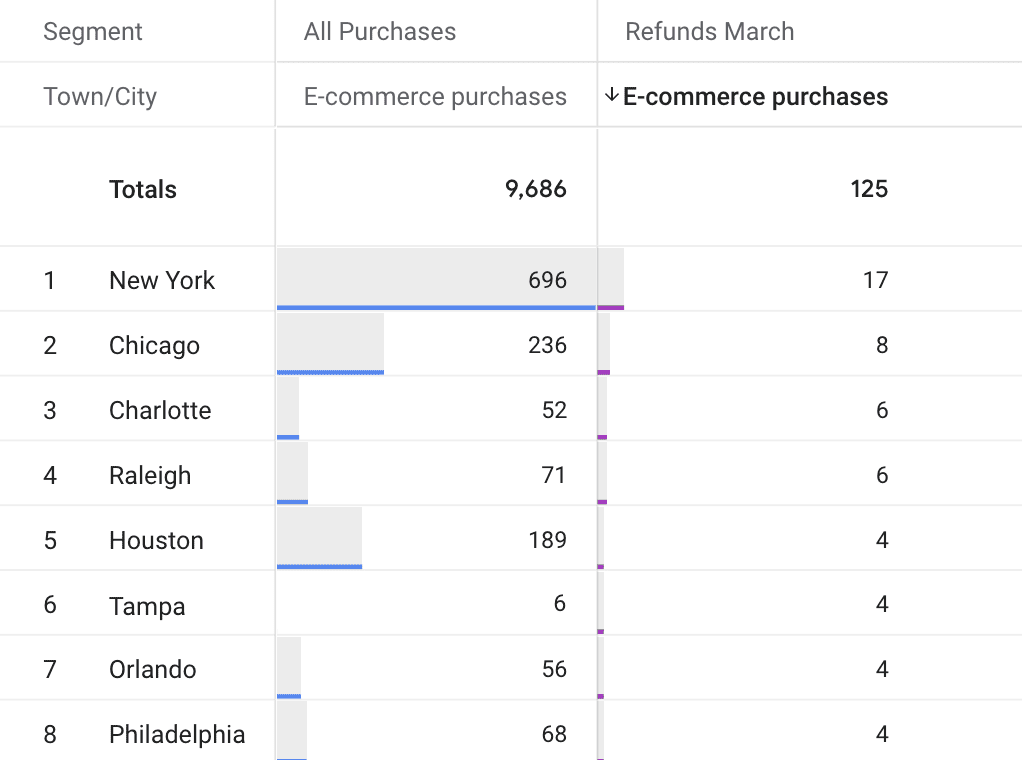
Finally, accurate refund tracking acts as a "canary in the coal mine" for your physical operations. By applying dimensions like City or Region, you can spot operational failures:
* Courier issues: a spike in refunds from a specific city might suggest your courier there is damaging goods or delivering late. In the following example this brand should definitely check wth has happened in Tampa during March:
* Faulty batches: if a specific brand within your catalog shows a sudden increase in refunds, you likely have a faulty batch from the supplier that needs immediate attention.
### Conclusion
Accurate refund tracking isn't just about cleaning up your dashboards; it’s about business survival. By using Littledata’s server-side tracking and the Transaction ID to bridge the gap between sales and returns, you can:
* optimize your marketing spend for profit
* fix product-level friction
* get a realistic view of your customers' true lifetime value
* and identify logistics issues that would otherwise be very hard to spot
While these strategies provide a solid foundation, the true power of this data lies in how you apply it to your specific niche. Start tracking the "truth" behind your refunds today, and stop chasing numbers that eventually - don't end up in your bank account.
### Related topics
* [How we track refunds in Segment and Google Analytics](/sources/shopify/tracking-order-refunds-with-littledata.md) — understand refund events, attribution, and edge cases.
* [Segments in Google Analytics](/google-analytics/behavior/segments-in-google-analytics-4.md) — build the refunded purchases segment used in this workflow.
* [GA4 Explorations: A Complete Guide for Ecommerce Growth](/google-analytics/behavior/ga4-explorations-complete-guide-for-ecommerce-growth.md) — analyze refunds by source, campaign, product, and location.
* [Building a Lifetime Value report In GA4](/google-analytics/conversions/lifetime-value-in-ga4.md) — compare long-term value after accounting for refund patterns.