> For the complete documentation index, see [llms.txt](https://help.littledata.io/llms.txt). Markdown versions of documentation pages are available by appending `.md` to page URLs; this page is available as [Markdown](https://help.littledata.io/integrations/google-ads/google-ads-how-it-works.md).
# How it works: Shopify to Google Ads
Which events and conversion actions Littledata sends to Google Ads, what customer data is included, and how to enable Enhanced Conversions for leads.
This page explains what Littledata sends from your Shopify store to Google Ads. It covers browser events, the conversion actions Littledata creates, and the Google Ads settings you need for Enhanced Conversions.
### Client-side events
| **Event Name** | **Description** |
| ---------------- | ----------------------------------------------- |
| page\_view | User has viewed any page |
| view\_item | User has viewed an item on your website |
| view\_item\_list | User has seen a collection page on your website |
Client-side events are tracked via Littledata's app embed directly to Google Ads.
Client-side events respect [Shopify's consent mode](https://help.littledata.io/partner-recipes/cookie-consent-integrations/shopify-customer-consent-api), so if your store has a cookie banner, users can opt out of the tracking of these events.
Client-side events are sent to your Google Ads conversion tag (*e.g., AW-123*). Purchases are not sent from the browser. They are sent server-side as the conversion actions described below.
#### How to check that client-side events are being sent
Google Ads does not offer a real-time view of events to verify that your entire setup is functioning correctly. However, for client-side events, you can use [Google Tag Assistant](https://tagassistant.google.com/) to check which events are being sent from your store to your Google destinations. By clicking **Add domain**, you can verify how your data is being sent to Google.
### Conversion actions
Littledata's Shopify to Google Ads connection automatically creates three conversion actions. They are automatically assigned a role, and their main purpose is to improve your targeting.
| **Conversion name** | **Role** |
| ------------------------------------------ | ----------------------------------------------------------- |
| `Purchase - Littledata` | Primary conversion, including all purchases |
| `New Customer Purchase - Littledata` | Secondary conversion, only first-time customer conversions |
| `Returning Customer Purchase - Littledata` | Secondary conversion, only returning customers' conversions |
Each conversion includes the order value and currency.
#### Using multiple primary conversion actions
If your Google Ads campaign is configured to track multiple primary conversion actions, Google will optimize towards all of them, treating each as a signal for bidding and budget allocation. This may dilute the effectiveness of your bidding strategy.
We recommend keeping our `Purchase - Littledata` conversion action as the only primary conversion action in your campaign. This ensures Google optimizes for the most accurate purchase data captured by our server-side tracking.
If you need to compare or validate Littledata's performance against other sources, you can set our conversion action as secondary temporarily, but keep in mind it won't be used for smart bidding in this case.
### Profit Signal
If you enable [Profit Signal](https://help.littledata.io/sources/profit-signal/how-to-use-profit-signal), Littledata switches the conversion value sent to Google Ads from revenue to the estimated profit of each order. Pair this with a value-based Smart Bidding strategy such as **Maximize conversion value** or **Target ROAS** so the algorithm optimizes against profit. Your reported ROAS then becomes a return on profit, and budget naturally moves toward the products and audiences that generate the most profit rather than the most revenue.
See [How to use Profit Signal](https://help.littledata.io/sources/profit-signal/how-to-use-profit-signal) for how profit is calculated and how to enable it.
### How to enable Enhanced Conversions
You will need to enable **Enhanced conversions for leads** and accept **Customer data terms** in your Google Ads account.
You can do this either in the Littledata installation process (where there is a step that will redirect you to the above-mentioned settings) or beforehand.
{% stepper %}
{% step %}
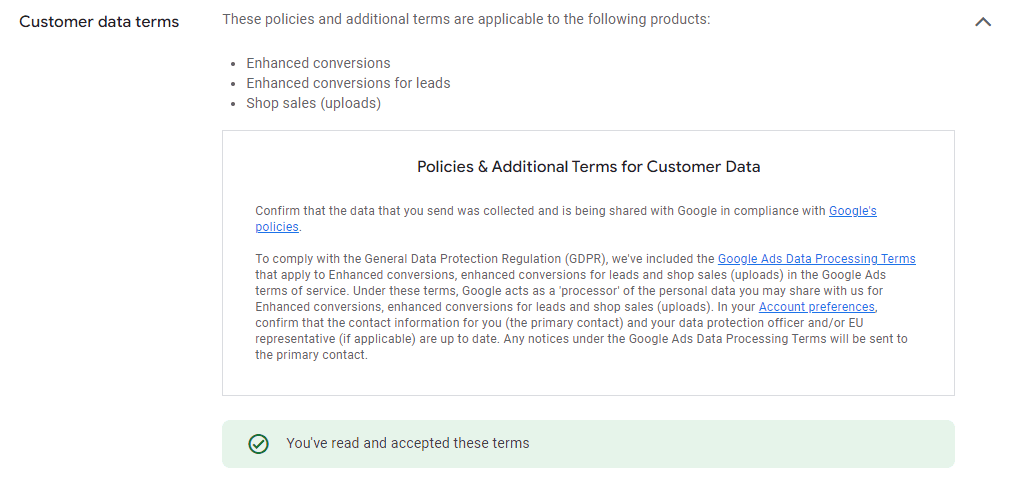
**Accept Customer data terms**
In your Google Ads account, go to **Goals** > **Conversions** > **Settings**, expand **Customer data terms**, and accept.
After you're done it should look like this:
The terms may have previously been accepted in Google Ads.
{% hint style="info" %}
If you can't see Customer data terms, it is because the conversions are tracked by a manager account. The customer data terms need to be accepted by the manager's account and any Google Ads manager account that uploads on behalf of the manager account using cross-account tracking.
{% endhint %}
{% endstep %}
{% step %}
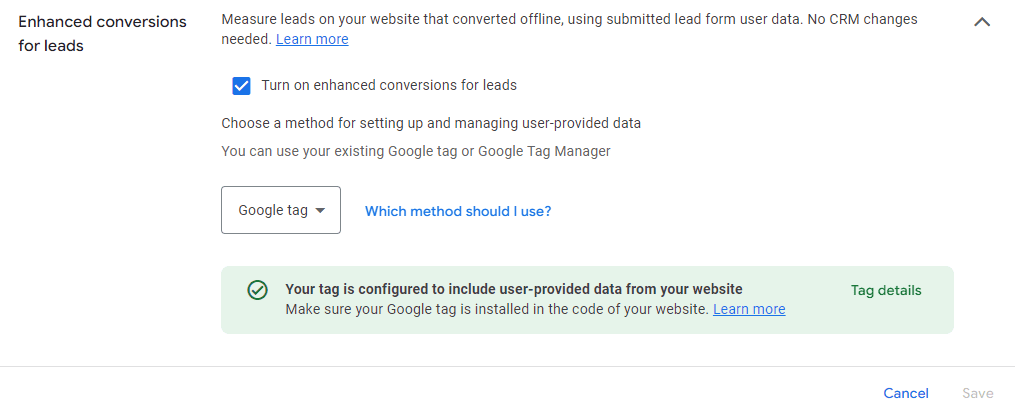
**Turn on Enhanced conversions for leads**
In your Google Ads account, go to **Goals** > **Conversions** > **Settings**, expand **Enhanced conversions for leads**, turn it on and save.
For Littledata's implementation, it does not matter which method (Google tag or Google Tag Manager) you select before saving.
After you're done it should look like this:
{% endstep %}
{% step %}
**Check the conversion action**
A conversion action is created automatically by Littledata during the setup process.
The name of the conversion action will be **Purchase - Littledata** so you can easily identify and measure the performance of our integration.
You can see your conversion action by going to **Goals** > **Summary**.
The **Inactive** status means that the conversion action is not currently being tracked or used for optimization in your campaigns.
After the conversion action starts receiving data, the **Inactive** status should disappear while the conversion value and the number of conversions should increase.
{% endstep %}
{% endstepper %}
#### Why Enhanced Conversions for leads instead of web?
[Google's documentation](https://support.google.com/google-ads/answer/9888656?hl=en) states that:
* **Enhanced Conversions for web** are relevant for advertisers who want to track sales and events that happen on a website.
* **Enhanced Conversions for leads** are relevant for advertisers who want to track sales that happen off a website (for example, phone or email) from website leads.
It may seem counterintuitive that Shopify stores would track leads.
However, where the Google click ID (`gclid`) is missing, **Enhanced Conversions for web** will reject events, so **Enhanced Conversions for leads** is the safer option to ensure even conversions without a known cookie will be processed.
#### Matching first-party user data
Each server-side conversion includes one customer identifier, hashed with SHA256 (the industry standard for one-way hashing):
* the customer's email address, or
* the customer's phone number, only when the order has no email address.
Littledata does not send names or mailing addresses to Google Ads.
Google will try to [match this first-party data with Google accounts](https://support.google.com/google-ads/answer/7474263). Google keeps the hashed versions of the email addresses and phone numbers linked to Google accounts. If the hashed value Littledata sends matches one of them, Google associates the conversion with that account.
### Related articles
* [Shopify to Google Ads installation guide](https://help.littledata.io/integrations/google-ads/google-ads-install-guide)
* [New and returning customer purchases in Google Ads](https://help.littledata.io/integrations/google-ads/new-and-returning-customer-purchase-in-google-ads)
* [Google Ads troubleshooting guide](https://help.littledata.io/integrations/google-ads/google-ads-troubleshooting-guide)
* [How to use Profit Signal](https://help.littledata.io/sources/profit-signal/how-to-use-profit-signal)