> For the complete documentation index, see [llms.txt](https://help.littledata.io/llms.txt). Markdown versions of documentation pages are available by appending `.md` to page URLs; this page is available as [Markdown](https://help.littledata.io/integrations/shopify-klaviyo/klaviyo-sms-clicks.md).
# Tracking Klaviyo SMS clicks
Tag your Klaviyo SMS links with UTM parameters so GA4 shows SMS traffic, and the orders Littledata tracks, in the SMS channel.
Tag the links in your [Klaviyo SMS campaigns](https://www.klaviyo.com/sms-marketing) with UTM parameters. GA4 then shows these visits in the SMS channel, and the orders Littledata tracks are credited to your SMS campaigns.
{% hint style="success" %}
Using Klaviyo for email too? Follow our [Klaviyo email tracking guide](https://help.littledata.io/integrations/shopify-klaviyo/track-klaviyo-campaigns-in-google-analytics).
{% endhint %}
### Set up UTM tracking for SMS in Klaviyo
{% stepper %}
{% step %}
**Open the Tracking section**
When you create an SMS campaign in Klaviyo, find the **Tracking** section. Turn on **Include tracking parameters** and **Customize tracking parameters**.
{% endstep %}
{% step %}
**Set the UTM values**
Use these values. The most important one is the medium: set it to `sms`, not `email`. GA4 puts visits with medium `sms` in its **SMS** channel group.
| UTM parameter | Value |
| ------------- | ------------- |
| Source | Klaviyo |
| Medium | sms |
| Campaign | Campaign name |
| Id | Campaign id |
| Customer | External id |
| {% endstep %} | |
{% step %}
**Check the links**
Finish the campaign and send yourself a test SMS. Klaviyo shortens the links in the message. When you tap one, it should redirect to your store with the UTM parameters in the URL.
{% endstep %}
{% endstepper %}
### Check SMS clicks in GA4
{% stepper %}
{% step %}
**Check real-time traffic**
Tap a link in your test SMS. In GA4, go to **Reports** > **Realtime overview** and check that your visit shows up.
{% endstep %}
{% step %}
**Check the Traffic acquisition report**
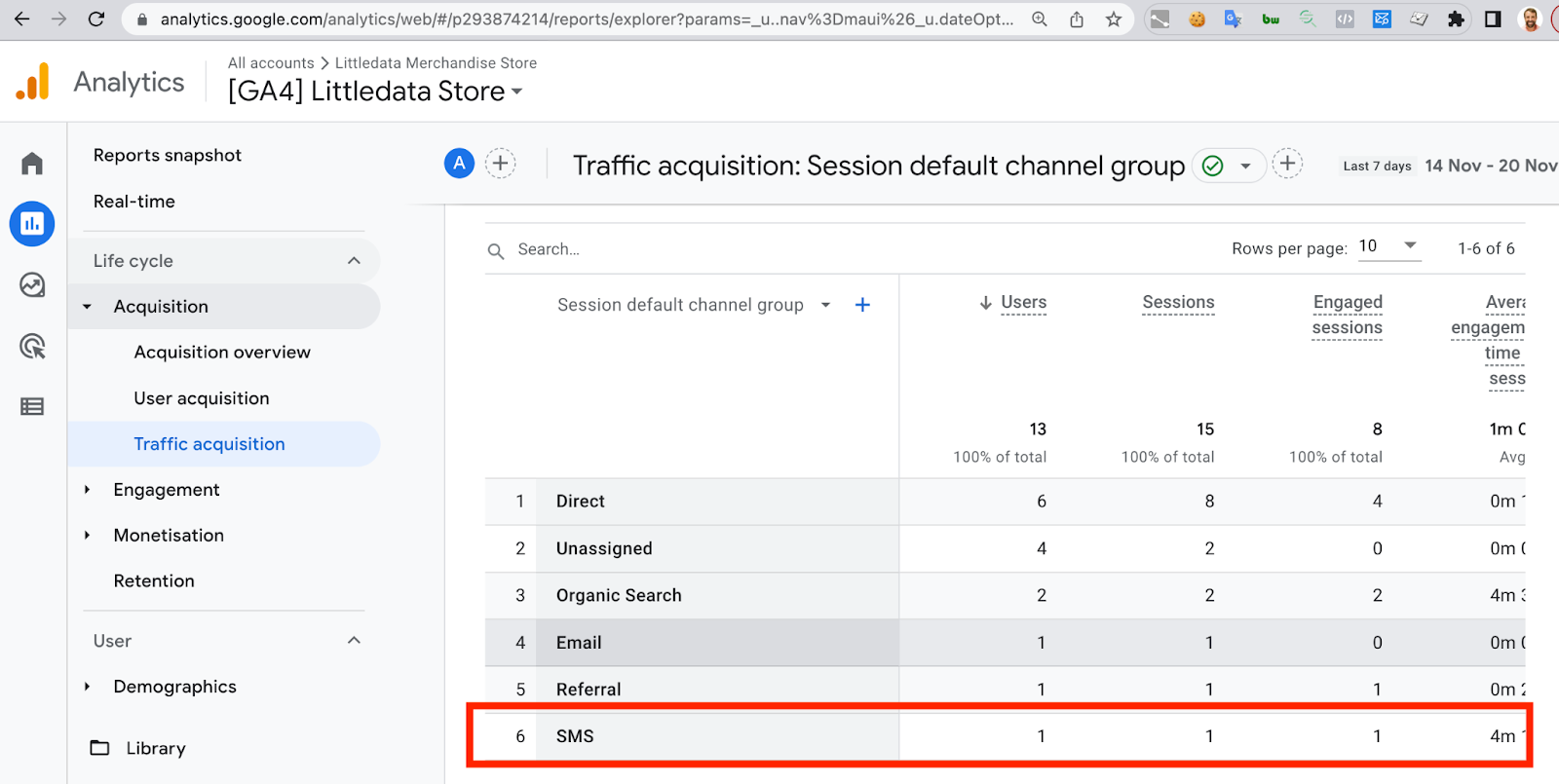
Wait a few hours, then go to **Reports** > **Acquisition** > **Traffic acquisition**. With **Session default channel group** selected, you should see a row for **SMS**.
{% endstep %}
{% step %}
**Compare buyers who came from SMS**
To see how users who first came from an SMS link buy, add a comparison to an ecommerce report. Click **Add comparison**, choose the dimension **First user default channel group** and select **SMS**.
{% endstep %}
{% endstepper %}
### Related articles
* [Track Klaviyo email campaigns in Google Analytics](https://help.littledata.io/integrations/shopify-klaviyo/track-klaviyo-campaigns-in-google-analytics)
* [Google Analytics](https://help.littledata.io/integrations/shopify-to-google-analytics)
* [Using Shopify with Segment and Klaviyo](https://help.littledata.io/integrations/shopify-to-segment/shopify-segment-klaviyo)
* [Use standard UTM tags (in How to fix Unassigned traffic in GA4)](https://help.littledata.io/advanced/troubleshooting/fix-unassigned-traffic-ga4#standard-utm-tagging)