> For the complete documentation index, see [llms.txt](https://help.littledata.io/llms.txt). Markdown versions of documentation pages are available by appending `.md` to page URLs; this page is available as [Markdown](https://help.littledata.io/integrations/shopify-to-google-analytics/using-google-consent-modev2.md).
# Using Google Consent Mode v2 with Shopify
How Littledata works with Google Consent Mode v2 through the Shopify Customer Privacy API, and how to turn on Consent mode for GA4.
Littledata supports Google Consent Mode v2 through the Shopify Customer Privacy API. This page explains how to turn it on and how your shoppers' consent choices are passed to Google.
### What is Google Consent Mode v2?
Google Consent Mode lets websites adjust how Google tags collect data based on each visitor's consent choices. Version 2 is the latest version.
Since March 2024, advertisers who want to run personalized Google Ads to users in Europe [must use Consent Mode v2](https://support.google.com/google-ads/answer/14505993?hl=en). You can read more about [Consent Mode on Google's help center](https://support.google.com/google-ads/answer/10000067?hl=en-GB).
### How Littledata works with Consent Mode
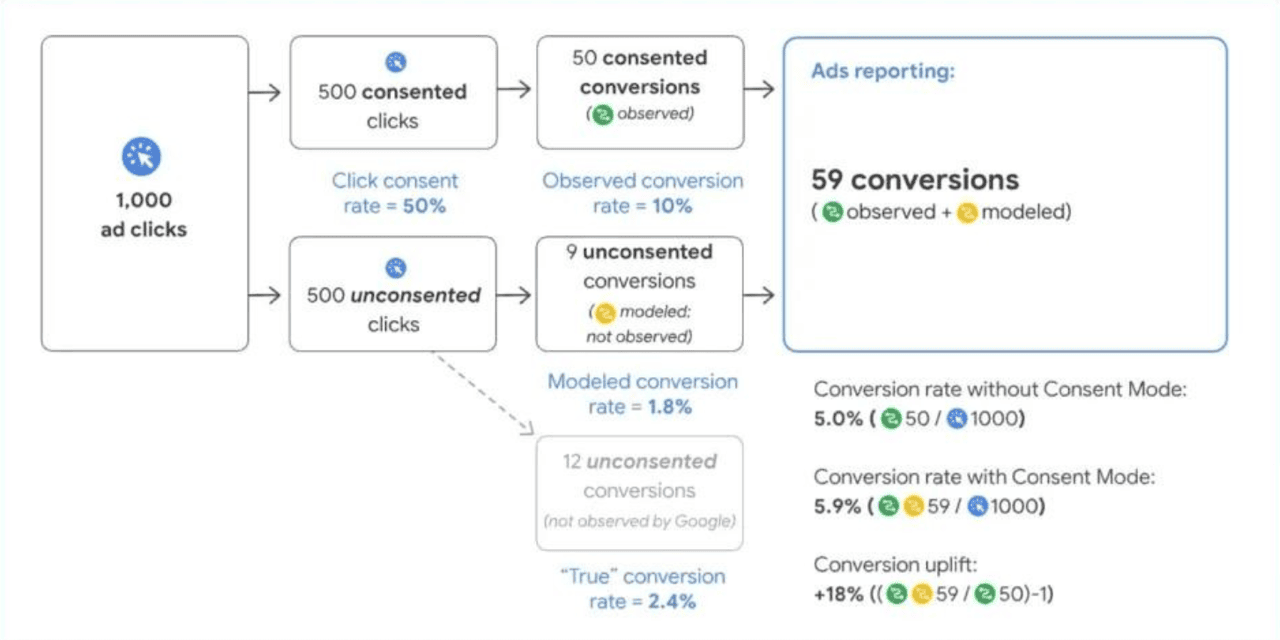
Littledata reads your shoppers' choices from the Shopify Customer Privacy API and passes them to Google as Consent Mode signals. It uses advanced consent mode. This means that when a shopper doesn't give consent, Google still receives cookieless pings, so it can [model your non-consenting traffic](https://support.google.com/analytics/answer/11161109).
Most [Shopify cookie banners](https://help.littledata.io/partner-recipes/cookie-consent-integrations/shopify-customer-consent-api) and some consent management platforms (CMPs) support the Customer Privacy API.
{% hint style="info" %}
Consent Mode only works if your store has a cookie banner. You can set one up in your Shopify admin under **Settings** > **Customer privacy** > **Cookie banner**, or use another banner app that works with the Shopify Customer Privacy API.
{% endhint %}
{% hint style="warning" %}
**Consent mode is off by default.** While it is off, Littledata sends no consent commands to Google and tracks every shopper as if they had given consent, no matter what your cookie banner shows. [Turn on Consent mode](#how-to-turn-on-consent-mode) before you rely on anything else on this page.
{% endhint %}
### How to turn on Consent mode
{% stepper %}
{% step %}
**Open your GA4 settings**
Open the Littledata app from your Shopify admin. Find your Google Analytics 4 destination, click the **⋯** menu on its card and choose **Settings**.
{% endstep %}
{% step %}
**Open General**
Open the **General** tab.
{% endstep %}
{% step %}
**Turn on Consent mode**
Turn on **Consent mode**.
{% endstep %}
{% step %}
**Save**
Click **Save**.
{% endstep %}
{% endstepper %}
There is one **Consent mode** setting per destination. There is no separate Consent Mode v2 setting. See [Changing the data pipeline settings](https://help.littledata.io/advanced/developer/data-pipeline-settings) for the other settings on this tab.
{% hint style="info" %}
**Shopify Markets**
If the [Shopify Markets](https://help.littledata.io/sources/shopify-markets/markets-settings) module is on, destination settings are saved per market, and that includes **Consent mode**. Turning it on for one market doesn't turn it on for the others. A market that is deleted and created again in Shopify comes back with default settings. Check the setting in every market you sell in.
{% endhint %}
#### Which connection controls the Google tag
GA4 and Google Ads share the same Google tag on your store, so only one connection sets its consent state:
* If you have a GA4 connection, its **Consent mode** setting controls the whole consent state. This includes the advertising parameters `ad_storage`, `ad_user_data` and `ad_personalization`. Turning on **Consent mode** for Google Ads has no effect on the tag while GA4 is connected.
* If you have no GA4 connection, your Google Ads connection takes over, and its own **Consent mode** setting applies.
### How Shopify consent maps to Google
When **Consent mode** is on, all four Google consent parameters start as `denied`. They update as soon as the shopper makes a choice in your [cookie banner](https://help.littledata.io/advanced/troubleshooting/consent-banner-design-ga4) or CMP:
| Google Consent Mode parameter | Set to `granted` when Shopify consent is |
| ----------------------------- | ---------------------------------------- |
| `ad_storage` | `marketing` = `yes` |
| `ad_user_data` | `marketing` = `yes` |
| `ad_personalization` | `marketing` = `yes` |
| `analytics_storage` | `analytics` = `yes` |
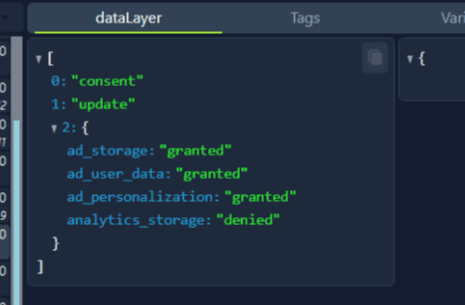
The three advertising parameters follow marketing consent. `analytics_storage` follows analytics consent. `ad_user_data` and `ad_personalization` are the two parameters that Consent Mode v2 added.
For example, a shopper who accepts marketing but declines analytics creates a consent update like this:
To check this on your own store, see [How to check Google Consent Mode v2 is working](https://help.littledata.io/advanced/developer/how-to-check-whether-google-consent-mode-v2-is-properly-working).
### Advanced consent mode and modeling
Basic consent mode only collects data from visitors who give consent. Advanced consent mode, which Littledata uses, also sends cookieless pings for visitors who don't. Google's comparison of the two:
| Feature | Basic consent mode | Advanced consent mode |
| ------------------------------ | ------------------------------------------------------------------------------- | ------------------------------------------------------------------------------------------------------------------------------------------------------- |
| Tag loading | Blocked until the visitor interacts with a consent banner. | Loads with defaults set to denied, unless set up otherwise. |
| Data sent | No data is sent before a visitor consents, not even the default consent status. | When consent is denied, the consent state and cookieless pings are sent. When consent is granted, cookies are written and all measurement data is sent. |
| Consent states | Set after the visitor interacts with the banner. | Default to denied, unless set up otherwise. Update based on the visitor's choice. |
| Tag behavior after interaction | Loads and runs consent mode APIs only when a visitor grants consent. | Adjusts tag behavior based on the visitor's choice. |
| Conversion modeling | General model (less detailed). | Advertiser-specific model (more detailed). |
When consent is denied, the Google tag still loads and sends events as cookieless pings. Google uses these to model the missing data. This includes Google Ads consent mode modeling, Google Ads online modeling, GA4 key event modeling and GA4 behavioral modeling.
### Related articles
* [How to check Google Consent Mode v2 is working](https://help.littledata.io/advanced/developer/how-to-check-whether-google-consent-mode-v2-is-properly-working)
* [Using cookie consent banners for GDPR compliance](https://help.littledata.io/partner-recipes/cookie-consent-integrations/shopify-customer-consent-api)
* [How consent banner design affects Google Analytics](https://help.littledata.io/advanced/troubleshooting/consent-banner-design-ga4)
* [Changing the data pipeline settings](https://help.littledata.io/advanced/developer/data-pipeline-settings)
* [How destination settings behave with Shopify Markets](https://help.littledata.io/sources/shopify-markets/markets-settings)