> For the complete documentation index, see [llms.txt](https://help.littledata.io/llms.txt). Markdown versions of documentation pages are available by appending `.md` to page URLs; this page is available as [Markdown](https://help.littledata.io/partner-recipes/cookie-consent-integrations/shopify-customer-consent-api.md).
# Using cookie consent banners for GDPR compliance
How Littledata uses Shopify's Customer Privacy API and cookie banners to respect visitor consent, and how to set it up.
Littledata works with Shopify's native cookie banner and most cookie consent apps. This helps you respect customer privacy and comply with rules such as the [ePrivacy Directive](https://help.shopify.com/en/manual/your-account/privacy/GDPR/ePrivacy-directive) (GDPR) in Europe. This page explains how it works and what you need to set up.
{% hint style="warning" %}
**Consent mode** is off by default on new connections. While it's off, Littledata tracks every visitor as if they had given consent, whatever your cookie banner shows.
Turn it on in the **General** tab of each destination (see [data pipeline settings](https://help.littledata.io/advanced/developer/data-pipeline-settings)). If [Shopify Markets](https://help.littledata.io/sources/shopify-markets/markets-settings) is enabled, check it for every market.
{% endhint %}
Littledata uses Shopify's Customer Privacy API to adjust tracking based on consent. The setup depends on which privacy solution your store uses:
1. [Shopify's native cookie banner](#enable-the-native-cookie-banner)
2. [A Shopify consent app](#compatible-shopify-apps)
3. [OneTrust](https://help.littledata.io/partner-recipes/cookie-consent-integrations/integrating-onetrust-shopify)
### How cookie banners work
In Europe, the ePrivacy Directive says a website must ask for consent before it stores cookies that are not strictly necessary for the site to work.
The usual way to get consent is a cookie banner. It explains that your store uses cookies and lets the visitor accept or reject them. Until the visitor chooses, tracking and cookies have to wait.
* Visitors who accept can be tracked right away.
* Visitors who reject, or don't choose, must not be tracked.
### Turn on Consent mode in Littledata
{% stepper %}
{% step %}
**Open the destination settings**
In the Littledata app, find the destination you want to update, click the **⋯** menu on its card and choose **Settings**.
{% endstep %}
{% step %}
**Turn on Consent mode**
Open the **General** tab and turn on **Consent mode**.
{% endstep %}
{% step %}
**Save**
Click **Save**. Repeat for each destination that should respect consent.
{% endstep %}
{% endstepper %}
### Compatible Shopify apps
Littledata works with any app that uses Shopify's Customer Privacy API to share the visitor's consent choices. Popular privacy apps include:
* [Pandectes GDPR Compliance](https://apps.shopify.com/gdpr-cookie-consent)
* [Consentmo GDPR Compliance](https://apps.shopify.com/gdpr-backpack)
* [OneTrust](https://help.littledata.io/partner-recipes/cookie-consent-integrations/integrating-onetrust-shopify)
{% hint style="info" %}
Even if your privacy app shows the cookie banner, set the banner regions in Shopify's Customer privacy settings too. See [Banner regions in Shopify settings](#banner-regions-in-shopify-settings).
{% endhint %}
### Enable the native cookie banner
{% stepper %}
{% step %}
**Open Customer privacy**
In your Shopify admin, click **Settings** > **Customer privacy**.
{% endstep %}
{% step %}
**Turn on the cookie banner**
Click **Cookie banner** and turn on the cookie banner for your store.
{% endstep %}
{% endstepper %}
### How customer privacy affects tracking
Once a privacy app or the native banner is set up, and Consent mode is on for the destination, Littledata uses Shopify's [Customer Privacy API](https://shopify.dev/api/consent-tracking) to decide if the visitor can be tracked.
Littledata's browser tracking waits for consent. As soon as the visitor gives consent, on the first page or later, tracking starts for your destinations.
Littledata waits for consent when Shopify says a cookie banner should show in the visitor's region, or when it finds a consent app on the page. If neither applies and the visitor hasn't made a choice, Littledata tracks them.
### Banner regions in Shopify settings
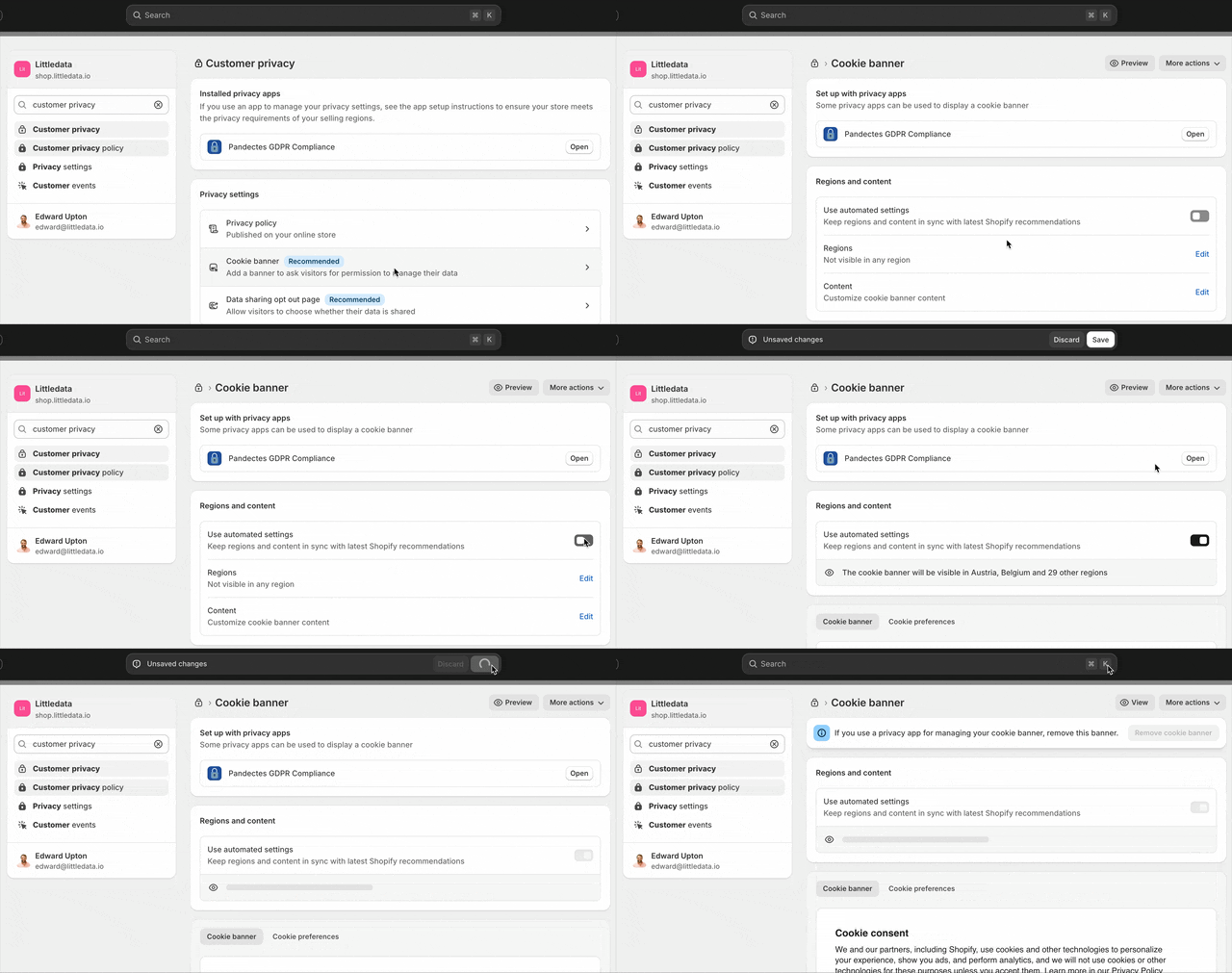
In your Shopify admin, under **Settings** > **Customer privacy** > **Cookie banner** > **Regions and content**, you can edit the regions where a cookie banner is shown.
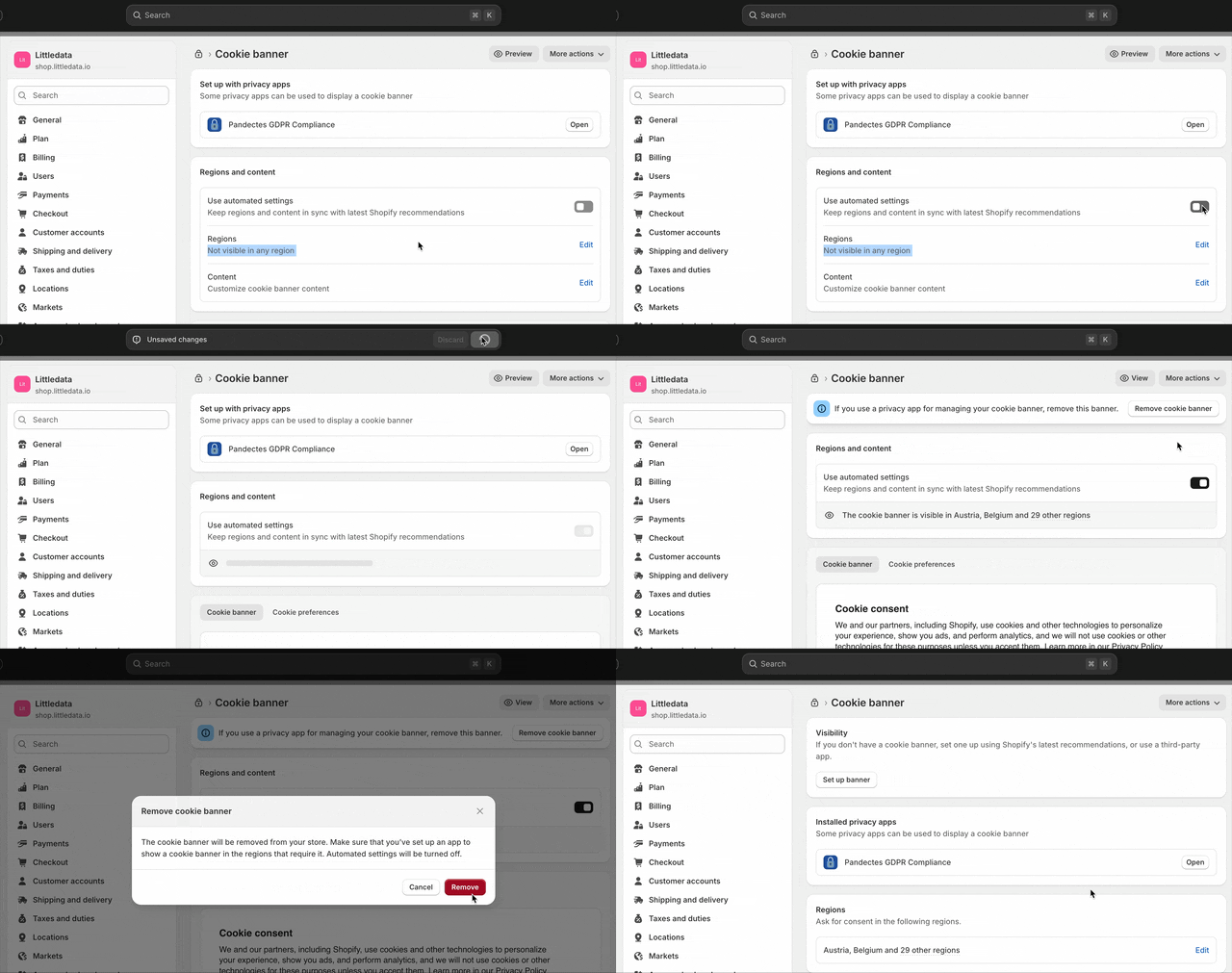
Some stores turn off the banner in all regions because they think this only applies to Shopify's native banner. Shopify uses these regions to decide when consent is needed, so Littledata uses them too. If this is your case, you'll see **Not visible in any region** under **Regions**.
{% stepper %}
{% step %}
**Reset the regions**
Under **Regions and content**, turn on **Use automated settings**. This resets the regions to Shopify's recommended countries.
{% endstep %}
{% step %}
**Turn off the native banner if you use an app**
If a privacy app shows your banner, turn off Shopify's native cookie banner.
{% endstep %}
{% step %}
**Check the countries match**
Make sure the regions match the countries where your privacy app shows its cookie banner.
{% endstep %}
{% endstepper %}
### Analytics vs marketing consent
Some cookie banners let visitors choose separately whether their data is used for analytics or for marketing. Littledata respects each choice:
| Destination | What consent controls |
| ----------------------------------- | ---------------------------------------------------------------------------------------------------------------------- |
| Google Analytics 4 | Sent through Google Consent Mode. `analytics_storage` follows analytics consent. Ad signals follow marketing consent |
| Segment | Browser events are sent if the visitor accepts analytics or marketing. The full consent object is sent with each event |
| Meta, TikTok, Pinterest, Google Ads | Browser tracking runs only if the visitor accepts marketing |
| Microsoft Ads | Microsoft's consent mode `ad_storage` follows marketing consent |
Klaviyo doesn't have a Consent mode setting in Littledata.
### How GDPR affects Google Analytics tracking
Each time the Google Analytics script loads, it can set a cookie (the `_ga` cookie) with an ID that follows the visitor across pages and sessions. That ID is sent to Google with each page view and event.
It's a first-party cookie, but Google Analytics is not strictly necessary for your store to work. So the visitor must be allowed to opt in first.
{% hint style="warning" %}
A common mistake is a store that shows a cookie banner while Google Analytics still tracks visitors before they opt in.
{% endhint %}
The challenge is to track the landing page and campaign source (UTM tags) as soon as the visitor consents, but not before.
If a visitor never consents and still buys, Littledata's server-side tracking records the sale, but without the marketing campaign that brought them. In Google Analytics, these orders show up in the Direct channel.
Most visitors do consent. So respecting consent will reduce marketing attribution, but not remove it. Read more in our guide on [cookies and attribution](https://blog.littledata.io/2023/06/28/the-truth-about-cookies-and-attribution).
### Cookie consent with Segment
If you use [Shopify with Segment](https://help.littledata.io/integrations/shopify-to-segment), the same rules apply.
Segment's analytics.js library uses local storage rather than cookies to track the visitor. To comply with the ePrivacy Directive, visitors still need to consent before events are sent to Segment.
The `analytics` object is available when the page loads, so you can queue other tracking events to send as soon as the visitor consents. No events or page views are sent from the browser until the visitor opts in.
If a visitor never consents and buys, checkout and Order Completed events still reach Segment. They won't be linked to a web session or to [marketing attribution](https://help.littledata.io/advanced/troubleshooting/troubleshooting-marketing-attribution-for-shopify).
### Tracking without consent
If you want to capture as much data as possible in a destination, leave **Consent mode** off for it, or turn it off again in the [data pipeline settings](https://help.littledata.io/advanced/developer/data-pipeline-settings).
Visitors are then tracked in all cases, even in regions where they should consent first. This is the default for a new connection.
### US state privacy laws (CPRA, VCDPA, CPA)
Privacy laws in some US states also require that visitors can opt out of tracking:
* California Privacy Rights Act (CPRA), along with the California Consumer Privacy Act (CCPA)
* Virginia Consumer Data Protection Act (VCDPA)
* Colorado Privacy Act (CPA)
These laws cover *"information that is linked or reasonably linkable to an identified or identifiable individual"*. They apply to any company "conducting business" in the state with information on 100,000 or more consumers.
Businesses covered must let visitors opt out of having their data processed. When you use the Shopify Customer Privacy API and turn on Consent mode, Littledata respects these opt-outs.
### Related articles
* [Integrating Consentmo with Shopify](https://help.littledata.io/partner-recipes/cookie-consent-integrations/integrating-consentmo-shopify)
* [Integrating OneTrust with Shopify](https://help.littledata.io/partner-recipes/cookie-consent-integrations/integrating-onetrust-shopify)
* [Using Google Consent Mode v2 with Shopify](https://help.littledata.io/integrations/shopify-to-google-analytics/using-google-consent-modev2)
* [Using Segment Consent Management with Shopify](https://help.littledata.io/integrations/shopify-to-segment/segment-consent-management)
* [How consent banner design affects Google Analytics](https://help.littledata.io/advanced/troubleshooting/consent-banner-design-ga4)