> For the complete documentation index, see [llms.txt](https://help.littledata.io/llms.txt). Markdown versions of documentation pages are available by appending `.md` to page URLs; this page is available as [Markdown](https://help.littledata.io/partner-recipes/yotpo/yotpo-sms.md).
# Track Yotpo SMS campaigns in Google Analytics
See how to get complete Yotpo SMS and Shopify data in GA4 with Littledata
### Why use Littledata with Yotpo SMS
* **One source of truth in GA4.** See which SMS campaigns drive sales, and when and where customers convert.
* **Server-side order tracking.** Littledata sends Shopify orders to GA4 from the server, so SMS sales are tracked alongside your other channels.
* **Better audiences.** Littledata captures browsing, checkout steps, orders and customer lifetime value (LTV). You can use this data for retargeting and audience building in Meta Ads, Google Ads, TikTok and more.
### How it works
The Yotpo SMS integration works alongside the [Shopify to GA4 connection](https://help.littledata.io/integrations/shopify-to-google-analytics/how-it-works-shopify-to-ga4). It sends data to GA4 without Google Tag Manager (GTM).
Littledata relies on the UTM parameters you [set up in Yotpo SMS](https://smsbump.com/knowledge-base/view/how-to-use-utm-codes-to-track-your-sms-results) for source, medium and campaign. Littledata picks up these UTM parameters and links them to the order. This works for one-off purchases and first subscription orders.
{% hint style="warning" %}
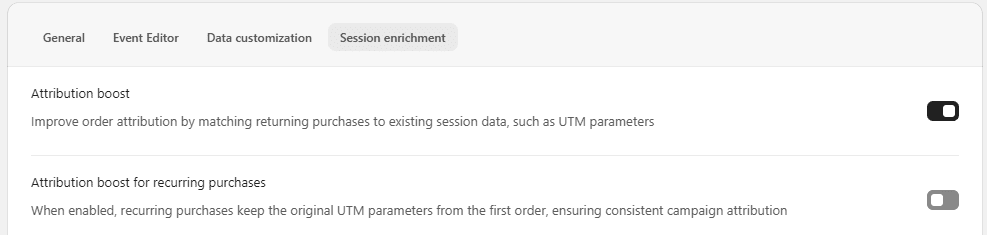
Recurring subscription orders (for example, from Yotpo Subscriptions) only keep the UTM parameters of the first order if **Attribution boost for recurring purchases** is on. This setting is off by default. To turn it on, open your GA4 connection in the Littledata app, click **Settings**, then open the **Session enrichment** tab.
{% endhint %}
{% hint style="info" %}
Littledata does not replace the [attribution model in Yotpo](https://smsbump.com/knowledge-base/view/sms-attribution-explained). It gives you an overall view of store performance and sales by channel, directly in GA4.
{% endhint %}
### Set up UTM parameters in Yotpo SMS
Use consistent UTM parameters so Littledata can attribute your SMS sales. You can also follow [Yotpo's guide to UTM codes](https://smsbump.com/knowledge-base/view/how-to-use-utm-codes-to-track-your-sms-results).
{% stepper %}
{% step %}
#### Open attribution settings
Log in to Yotpo SMS and go to **Settings** > **Attribution**.
{% endstep %}
{% step %}
#### Set the source
Under UTM tracking, set `utm_source` to a static value, such as "SMSBump" or "Yotpo".
{% endstep %}
{% step %}
#### Set the medium
Set `utm_medium` to the dynamic value **Channel type (sms/email)**.
{% endstep %}
{% step %}
#### Finish the campaign setup
Set up the rest of your campaign parameters as needed, then save.
{% endstep %}
{% endstepper %}
With a static source and a dynamic medium, Littledata can track checkout steps, sales and refunds from your Yotpo SMS campaigns.
### Where to see the data in GA4
{% stepper %}
{% step %}
#### Open the traffic acquisition report
In GA4, go to **Reports** > **Acquisition** > **Traffic acquisition**.
{% endstep %}
{% step %}
#### Show source and medium
Change the main dimension to **Session source/medium**.
{% endstep %}
{% step %}
#### Filter for SMS
Type `SMS` in the search bar to see only your SMS traffic.
{% endstep %}
{% step %}
#### Break it down by campaign
Add **Session campaign** as a secondary dimension. The report now shows each Yotpo SMS campaign active in the selected date range.
{% endstep %}
{% endstepper %}
### Build a report of SMS-driven purchases
If you sell subscriptions, Littledata splits recurring orders from one-off orders and first subscription orders. Learn more about [subscription tracking](https://help.littledata.io/sources/shopify/tracking-subscription-orders-in-the-shopify-checkout).
To see the purchases that came from Yotpo SMS, create an exploration in GA4:
{% stepper %}
{% step %}
#### Create a blank exploration
In GA4, go to **Explore** and create a **Blank** exploration. Name it something like "SMS-driven purchases".
{% endstep %}
{% step %}
#### Add dimensions and a metric
Add the dimensions **Session default channel group** (or **Session source/medium**) and [**Affiliation**](https://help.littledata.io/integrations/shopify-to-google-analytics/create-affiliation-custom-dimension-ga4). Add the metric **Purchase revenue**.
{% endstep %}
{% step %}
#### Add them to the report
Double-click each dimension and metric to add it to the table.
{% endstep %}
{% step %}
#### Filter for SMS
Under **Filters**, add a filter where **Session default channel group** contains "SMS".
The **Affiliation** dimension shows the type of order placed through your Yotpo SMS campaigns. Littledata sets this value on the purchase event it sends to GA4.
{% endstep %}
{% endstepper %}
### Related articles
* [How the Shopify to GA4 connection works](https://help.littledata.io/integrations/shopify-to-google-analytics/how-it-works-shopify-to-ga4)
* [How to create and use the custom dimension for Affiliation in GA4](https://help.littledata.io/integrations/shopify-to-google-analytics/create-affiliation-custom-dimension-ga4)
* [Tracking subscription orders in the Shopify checkout](https://help.littledata.io/sources/shopify/tracking-subscription-orders-in-the-shopify-checkout)
* [Track Postscript SMS campaigns in Google Analytics](https://help.littledata.io/partner-recipes/postscript/track-postscript-sms-clicks-ga)