Setup & sync flow for Shopify Markets
Littledata integrates with Shopify Markets so you can configure tracking and integrations per market across supported destinations like GA4 and Meta.
Once enabled, Littledata automatically stays in sync with your Shopify Markets setup — so when markets change in Shopify, your Littledata configuration updates automatically.
How Shopify Markets syncing works
Littledata continuously syncs your Shopify Markets using:
-
Shopify Admin API – to fetch the current list of markets
-
Shopify webhooks – to detect changes as they happen
This allows Littledata to track when markets are active, draft or deleted. The list of active markets in your Shopify Admin will always match what you see in Littledata.
Enabling Shopify Markets in Littledata
When you enable the Markets module during setup:
-
Littledata fetches and displays all currently active Shopify Markets
-
Enabling the module Makes all supported destinations market-aware and allows you to configure events and integrations per market, rather than globally:
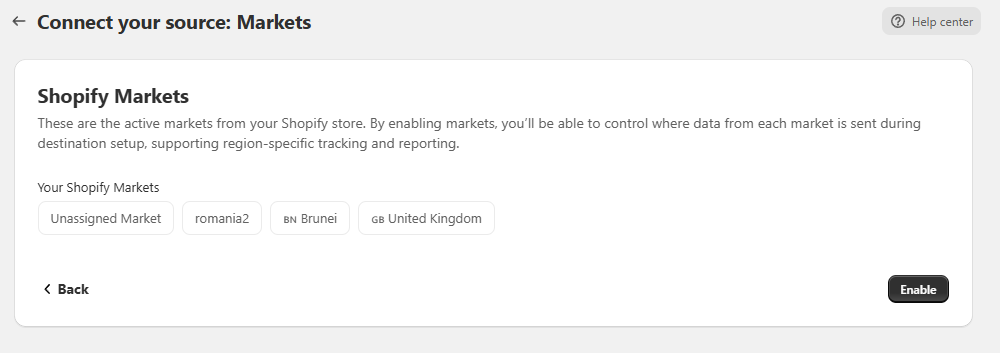
At this stage, each market is initialized using default (factory) settings, which you can customize later.
Managing markets after setup
Once the Markets module is enabled:
-
Any activated destination will show a Markets table
-
Each row represents one active Shopify market
-
From this table, you can view all active markets and adjust tracking or integration settings per market:
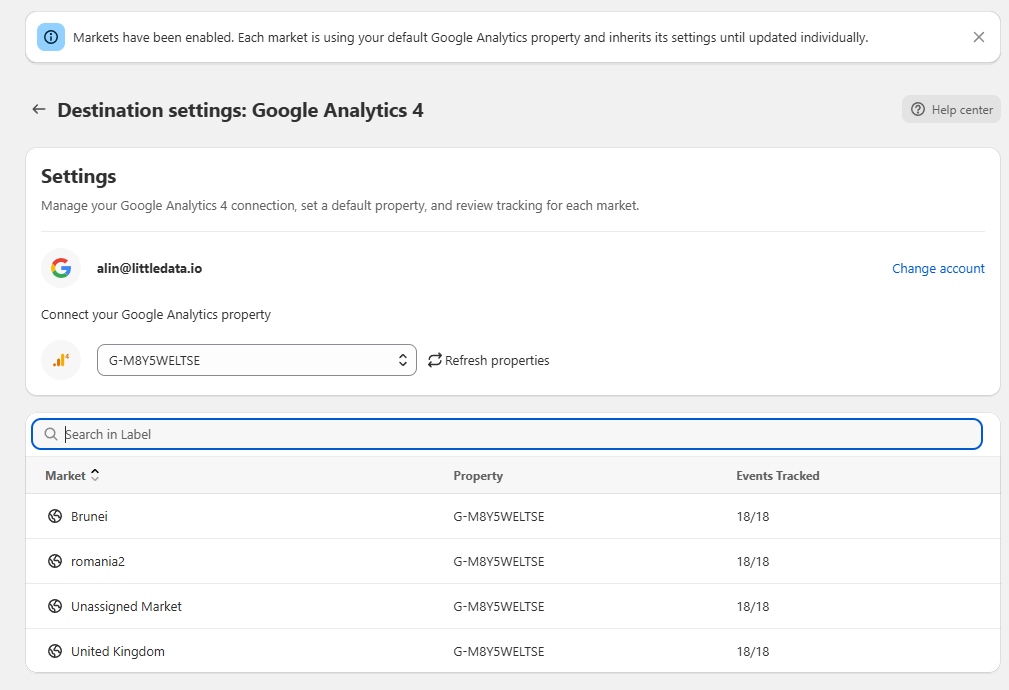
This makes it easy to tailor your setup for different regions, currencies, or storefront strategies without duplicating connections.
What happens when markets change in Shopify?
Shopify remains the source of truth for market state. Littledata does not create or manage markets directly.
Here’s how changes are handled:
-
Market added in Shopify
→ Automatically appears in Littledata -
Market disabled in Shopify
→ Removed from active configuration -
Market deleted in Shopify
→ Removed from active configuration
All updates are propagated automatically via webhooks and API syncing, usually in near-real time.
Market parameters in Littledata events
All Littledata events are market-aware by default, regardless of whether the markets module is enabled. This means every event includes market identification parameters, allowing downstream tools (such as GA4 and ad platforms) to segment, filter, and report based on market context. This behaviour is always on and does not depend on per-market configuration.
Each event includes two parameters:
-
market_handle – a human-readable market identifier (derived from the Shopify market name and editable in Shopify)
-
market_id – the internal Shopify market ID (assigned by Shopify and not editable)
Both parameters are always sent together. For events attributed to Unassigned markets, Littledata uses fixed system values (market_id = 0, market_handle = unassigned_market) that do not correspond to any Shopify market.
How destinations handle market parameters
-
Analytics & Ads platforms (GA4, Meta, TikTok, Pinterest, Google Ads, Microsoft Ads):
All supported events include market_handle and market_id as event parameters. -
Klaviyo:
Events include market_handle and market_id, along with customer_locale for backward compatibility. Market parameters are also synced as customer profile attributes. -
Attentive:
Market parameters are not supported due to limitations of the Attentive Events API. Events are still sent, but without market context.
Exact parameter naming and placement can vary by destination, so destination-specific schemas should be used as the source of truth.
\